What is Hexagonal Architecture?
Hexagonal Architecture (also known as Ports and Adapters) is an architectural pattern that structures applications to isolate the core business logic from external concerns like databases, APIs, UI frameworks, and other infrastructure.
The architecture is visualized as a hexagon (though the number of sides doesn’t matter) with the business logic at the center and external dependencies on the outside.
Why Hexagonal Architecture Exists
Decoupling Business Logic from External Dependencies
The primary goal is to decouple business logic from infrastructure and external systems. This means:
- Your domain logic doesn’t depend on databases, frameworks, or external APIs
- You can change technologies without rewriting your core application
- Business rules remain pure and testable without complex setup
Delaying Technology Choices
Hexagonal Architecture allows you to delay technology decisions by creating in-memory adapters:
|
You can build your entire application with in-memory adapters and decide on the actual database later. Who knows? Maybe you’ll end up using postgres but for some legal compliance you’ll store other data in s3 WORM buckets.
Demo Applications and Early UX Exploration
Frontends can behave like demo apps using in-memory adapters:
- Build the UI and user experience without waiting for backend implementation
- Click through flows, test interactions, and iterate on UX
- Replace in-memory adapters with real HTTP adapters when the backend is ready
|
This approach lets product teams validate ideas and user flows early, reducing waste.
Testability
With hexagonal architecture, testing becomes straightforward:
- Unit tests: Use in-memory adapters (fast, no I/O)
- Integration tests: Use real adapters (databases, APIs)
- E2E tests: Test the full system with real infrastructure
No need for complex mocking frameworks—just swap adapters.
Core Concepts
Ports
A port is an interface that defines how the outside world interacts with your application, or how your application interacts with the outside world.
Ports are defined by the business logic and represent what the application needs or provides.
|
There are two types of ports:
Driving Ports (Primary Ports)
Driving ports allow external actors to drive your application. They represent use cases or application services.
Examples:
- REST API endpoints
- CLI commands
- GraphQL resolvers
- Message queue consumers
- Scheduled jobs
|
Driven Ports (Secondary Ports)
Driven ports are interfaces that the application uses to interact with external systems. They represent dependencies that the business logic needs.
Examples:
- Database repositories
- Email services
- Payment gateways
- External APIs
- File storage
|
Architecture Layers
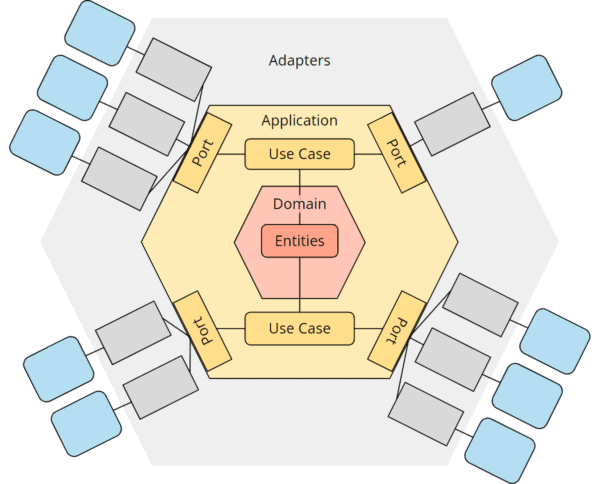
Dependency Rule: Dependencies point inward. The core business logic depends on nothing. Ports are defined by the core. Adapters depend on ports.
Transaction Management
Transactions are the Responsibility of the Driving Adapter
In hexagonal architecture, transaction management belongs to the driving adapter (or the infrastructure layer), not the business logic.
Why?
- Business logic should remain pure and unaware of transactional concerns. across organizations.
- Transactions are an infrastructure concern
|
Domain Events
Why Domain Events?
Domain events are a powerful tool to decouple logic that needs to react to changes made by another part of the application.
Instead of:
|
Use domain events:
|
Domain Event Handlers Must Run in the Same Transaction
Critical rule: Any handler reacting to domain events must run in the same transaction as the operation that triggered the event.
Why?
- Consistency: If the transaction rolls back, event handlers should not have executed
- Atomicity: Side effects must be part of the same unit of work
- Reliability: Prevents partially applied changes
If an event handler fails, the entire transaction (including the original operation) should roll back.
Note: If you need to perform domain events across multiple services or systems, consider using a saga pattern or outbox pattern to ensure eventual consistency. Coming soon in this knowledge base!
Synchronous vs Asynchronous Events
- Synchronous events (same transaction): Use for critical side effects that must succeed or fail atomically with the main operation (e.g., updating denormalized data, enforcing invariants across aggregates)
- Asynchronous events (separate transaction, message queue): Use for non-critical side effects that can be eventually consistent (e.g., sending emails, updating search indexes, external webhooks)
|
Benefits Summary
- Testability: Swap adapters for fast unit tests with in-memory implementations
- Flexibility: Change technologies without touching business logic
- Delay decisions: Build with in-memory adapters, choose real tech later
- Portability: Run the same core logic in different contexts (web, CLI, serverless)
- Clear boundaries: Separation of concerns between domain and infrastructure
- Demo-driven development: Build UX early with fake backends
Common Mistakes
❌ Leaking Infrastructure into the Domain
|
|
❌ Ports Defined by Adapters
Ports should be defined by the application’s needs, not by external libraries.
|
❌ Use Cases Depending on Concrete Adapters
|
Folder Structure Example
|
Resources
- Alistair Cockburn’s original article: Hexagonal Architecture
- “Clean Architecture” by Robert C. Martin
- “Implementing Domain-Driven Design” by Vaughn Vernon (long read but worth it)